Tuesday, May 3, 2011

Grease is the Word

It has to be said.

It started wh:ile watching "Hawaii 5-0".

Scott Caan is a nice enough looking guy. I mean, he is no Alex O'Loughlin,


(you're welcome) but on the other hand I wouldn't throw him out of bed either, unless, that is, he showed up with this hairstyle he is fond of sporting of late:

Really? Psst ... this is NOT a good look!

But then I remembered the Trumpettes. Well, 2 of the Trumpettes - Eric and Don, Jr (DJ).


At least Ivanka's stylist hasn't steered her down this greasy road.

And then I started seeing it everywhere:


Oh, Zach.


and another Zach


Alec


Kellan


Oh, McGee...


Antonio


Travolta -- oh wait. That's actually Tony Manero. In the 70s. Nevermind.
Naturally, Brad Pitt has to get in this.

At least, it's better than THESE choices of his:


Gentlemen: Grease is just not the way to go. EVER.


But at least no one has gone HERE lately:


Hope I haven't given anyone any brilliant new ideas.

Sunday, March 27, 2011

Me and my iPad, round 3 (oh, and I've made some jewelry, too)

Well, the iPad and I have reached a detente.

Here are the things I like about it:
  • its portability
  • the web browser (and everything else, duh) boots immediately, unlike my laptop
  • SplashID: a terrific app for securely storing passwords and other sensitive info. You can toggle between the browser and splashID whenever you need to look up or create a new password.
  • Netflix: the iPad is perfect for streaming video content
  • the games: great animation, resolution, graphics. But my left hand and wrist get sore from holding the iPad, because while it is light (though my case adds some weight and dimension to it) it isn't weightless. And I only have one hand free for game play. My case has a built-in stand, but it isn't the right angle, or I don't have the right height stand to set the whole unit on, in order to have it be at an accessible distance both for my eyes and my hands, so there you have it.
  • my calendar app: very handy (and portable) - and also serves as a To-do list. But this app has drawbacks - it takes far longer to make an entry of any sort than it does to jot in down in a day-planner.
  • readers: they are all terrific (Kindle, Nook, iBooks, etc) - well organized, back lit; just a pleasure for reading (but far heavier than a Kindle, and easy to inadvertently turn pages by touching the screen)
  • the native Notes app: great for quickly jotting down grocery items, reminders, etc
  • the photo album: I have finally loaded my entire jewelry portfolio onto the iPad. But this has drawbacks, too - you have to load all photos through iTunes on your laptop/PC, and it must do a full sync every time you want to add even one photo, and with 1850 photos and counting in the album, this takes a considerable amount of time (a full 30 minutes on my laptop to sync the photos).
In all honesty, most of my time on the iPad is spent playing games.

These are the features I find mediocre, and certainly NOT as functional as my laptop:
  • document handling: I looked at at a number of apps, and finally chose the pricey DocsToGo, because it supports .doc, .ppt, .xls, and .pdf (possibly more, but these are the big 4 for me). It also must be synced though iTunes IF you want your documents to be hard-stored on your iPad. If you are OK with them being out in the cloud, and therefore only accessible if you have WiFi access, then that is another way to go. But I needed the ability to read and modify certain docs at any time, so iTunes it is. At least with the document file transfer mode in iTunes, you can quickly just add docs one or 2 at a time, without having to do a full document sync each time. 

My biggest issue with documents on the iPad is the #&$^% iPad keyboard. As I said above, I really need to hold the iPad to keep it steady AND at the correct focal length for my vision, and at the right angle. The built-in stand in my iPad case is great for reading, but not for using the keyboard or the touchscreen - the pressure of my fingers knocks it right over. So when reduced to one hand to type with, on that crazy iPad touch-screen keypad, I am basically typing with one finger (can't retrain my right hand to do the whole Qwerty keyboard by itself), so it takes forever to do data entry anyway, and add to this the fact that my fingers (which are truly average size) hit the wrong keys fully half the time, so I have to type very very slowly, and make a lot of corrections. So I try to do all document writing/editing on my laptop, and save the iPad document app for reading only. Not as efficient, but that's my solution.
  • Zite: I am crazy about the idea of this customizable, intuitive news app. But I have to rate it as mediocre, because of the scrolling issues mentioned above - every touch of the finger opens something I didn't want to open. And even more annoying, the articles are often abridged articles from the web, and usually contain hyperlinks, and in order to access the links or the additional content, after clicking on the link, you get a pop-up asking if you want to open the content in Safari. This really seems like an annoying, duh feature to me - admittedly, Safari is the only browser I have on my iPad (does Zite know this?) - so of course, I want to open the link in Safari. Why do I have to click yes every damn time? Just open the link, please.  And since Zite seems to be a mini-search engine of sorts, much of the content in the individual sections is repetitive (for instance, Star Trek is a module I have added to my Zite, and while it has great content, this week it has had article after article from various sources wishing Leonard Nimoy and William Shatner a happy (80th!) birthday. So, happy, happy birthday Kirk and Spock.

Here are the features I try to avoid at all costs, and reserve for when I can be on the laptop
  • web browsing: This is simply a comedy of errors on the iPad. I use the native Safari browser, but doubt any other browser would be different. And the same issues exist with many specialty web apps: The webpages are too small to be seen on the iPad, so you have to pinch to enlarge, and then scroll around endlessly, as each finger swipe sends you farther than you wanted to go. And in so many apps and webpages, so much of the content is clickable that if you touch the screen at all to try to slow down the scrolling or just to scroll a bit further, you are likely to accidentally click a hyperlink, and off you go...  And oddly enough, one of the worst apps for this accidental hyperlinking is AppAdvice, the iPad app guru - I can't scroll anywhere in that app without clicking into an article I didn't want to open. And if you touch anywhere near the bottom of the screen, you will likely be taken (inadvertently) to another section of the app
  • e-mail: takes forever to read in the iPad - for the same reasons as the web-browsing. And to try to reply to e-mails from the iPad? Same issues with the keypad. Not a time-saver at all
  • anything involving more than a few taps of the keyboard.
And here are features I personally find no use for, at least not yet:
  • iPod: Yes, I've loaded my tunes onto the iPad. But there are far better options for listening to music in the situations I find myself wanting to listen to music. Would have to have headphones for listening to iPad tunes at a doctor's office, or on a plane; and I have a stereo iPod doc at home and at work, which provide better sound quality.
  • GPS: I have one in my car, and really don't see how the apps that offer GPS/traffic info on the iPad would work without active WiFi access. Which one doesn't usually have while driving.

I've probably left some stuff out, but that is certainly most of it. So while I like my iPad, I can't say I love it, and I'd be fine without it. But we are peacefully coexisting.

Here are a couple of things I made this week: I beaded around a gorgeous raku cabochon, and forged and enameled a copper palmetto tree pendant (a custom order). I am still working on some ideas of how to creatively design a necklace to support the beaded pendant.


Thursday, February 24, 2011

iPad, Round 2

Well, my last post has been picked up by iPad Gear Talk, a tech blog. 

On to today's iPad update:

Downloaded Grocery IQ, a free app designed to simplify my grocery shopping experience. Yay! I am all for that.

It has coupons (of course, you have to manually print them), and the ability to make different shopping lists for many different stores, and you can then customize your list by aisle according to the layout of your store. But it also has what is apparently the #1 most desirable feature of all the available grocery list apps: the ability to e-mail your grocery list to anyone. ANYONE, people*.

So please leave your e-mail addys in the comment section, as I am going to start an e-mail mailing list for everyone who wants to know what I'm gettin' at the grocery store. Fascinating! So fascinating, in fact, that I also plan on starting a new blog: My Grocery Lists. I have already heard the the Woz plans to be my first follower!

So I made up my first grocery list on the iPad today, using Grocery IQ. Took 55 minutes. For 16 items. I am absolutely blown away by how much this feature has already eaten away at  improved my busy lifestyle. Do you have ANY idea how long it would have taken me to write 16 items on a Post-it note and shove it in my pocket? Maybe 55 seconds .... but that is not the point, people. I saved a twig, here. (How many trees does it take to make a Post-it, anyway?)

Now, when I go to the store tonight after work, I have to take in the iPad, open up the app, roam the aisles finding my items while rearranging the built-in app aisle set up to match the actual aisle set-up at my store, and then check off each item as I find it. I wonder how many screens that will involve, since putting 16 items on my list involved, on average, 6 screens per item. And I'm not counting (although I should) the additional screens needed because the same "finger-swooshing" movement that you use to scroll through the app's many grocery items, looking for the one you want to add to your e-list, causes inadvertent selection of some random item you touched as you were swooshing, adding it to your list, and requiring 5-6 more screens to delete the unwanted item, and start hunting for the wanted one again. Wow. Simple!!

Not so pleased with this. It isn't simpler, more convenient, faster - certainly not more efficient.

Maybe I could e-mail a scan of my post-it shopping list to someone at Apple, and they could so my grocery shopping. Now THAT is an app I would even pay for!

*I fully realize that my amazement at the popularity of this ability to e-mail grocery lists to anyone and everyone you know is probably directly proportional to the fact that I live in a one-person, 2 dog household. The only entity who would be remotely interested in doing my grocery shopping for me would be Bailey, and he would skip the toilet paper, and load up the cart with Cheese Doodles, popcorn, and ice cream.

Tuesday, February 22, 2011

The iPad vs. the Luddite

Not really - I'm not a Luddite. I am a gadget slut. I admit it. Love the electronic gadgetry.

But the economic downturn has really hit me hard, and I can't afford all the cool toys (or groceries) that I wish I could.

So I felt like an addict falling off the wagon when a friend showed up 10 days ago with her iPad - naturally, I'd heard of them, but I had never SEEN one, and she pushed a few buttons, and I knew I had to have one.

And so I bought one that night. And posted same to Facebook. Where everyone told me how much I would Loooooove it!


It arrived a week later (from China, of course!), and I started loading it with free apps, and playing around with it, and spent some more $ getting my home and work converted over to Wireless, because you can't really use an iPad unless you have Wi-Fi connectivity, and here's my dilemma:

Loving it? Not so much.

So far, its major usefulness for me is to stream instant movies from NetFlix at work. Which I can also do on my laptop, but my work laptop is NOT in an area where I can also work on jewelry creation, so it's nice to be able to stream movies over at my workbench.

Of course, I was already watching NetFlix DVDs there on my portable DVD player, so it's not like the iPad has changed the movie situation that much - but admittedly now I can watch some instant ones while waiting for the turn around on the hard copies, though NetFlix's choice of instant movies is highly limited, so this capability is really NOT a big deal.

There's a Kindle app. Nice, but I really splurged for Christmas and got myself a Kindle, so I already had one! Now I have 2.  $$$, buh-bye. 

There's a browser, and the iPad boots instantly, so that's nice, but I can browse on my laptop, and it is much easier to browse and type with a mouse and a real keypad, vs the iPad's keyboard and finger-swooshing.

Calendar. Yeah, there is one. But it is so much faster to write an appt in my Day-Runner than to open the iPad, turn it on, unlock the screen (WTF with THAT feature), open the app, and then navigate through all the screens just to enter your hair appointment on the correct day at the correct time. Hunh-uh.

Lists. I love me some To-Do lists. But creating them in the iPad is another labor and screen-intensive ordeal (seriously? my lists have to have tags?); and I can't see myself toting the iPad around the grocery store, and waking it up every time I need to check the grocery list.  So the Luddite in me would probably sit down in parking lot of the grocery store, and re-write my iPad grocery list onto a post-it note to shove in my pocket for a more user-friendly grocery-shopping experience. 1 step forward electronically, 2 steps back.

iPod. Have one, and I have a wonderful stereophonic iPod dock at the shop, so I already have all my tunes at my fingertips. I've moved all my tunes to the iPad, but can't see myself using the iPad to listen to music. If I were waiting at a doctor's office, I would have to have headphones - and at work and home I already have my music set up. Meh.

Games - not a big issue. If I have time to kill, I'll read on the Kindle app.

Part of the problem, IMO, is that I don't get out much. I'm at home, I'm at work. Have laptops both places. So maybe if I travelled more, or was hanging out @ Wi-Fi spots, I might find the iPad more useful.

My brother has been offering lots of advice, which I really appreciate. He's been incredibly patient, and is like a walking iPad Wiki. One of his suggestions was to put my jewelry photo portfolio onto the iPad, so I can show folks the high-res photos of my work anytime. And I am going to start transferring these (thousands of) photos tonight.

My brother also sent me a link to appadvice.com, to help me make more informed decisions before purchasing any non-free apps. But I was laughing hysterically after reading just one description of a recommended app - it was written in such tech-speak I literally could not comprehend what they were trying to say. So I basically need an app to translate this app's geek-speak to English!

The iTunes AppStore gives extremely limited info on the functionality/capability of the apps, and then, for most of the apps, there are customer-provided "reviews". But just as the grass is always greener on the other side, one person's peeve about an app is another user's favorite thing, so deciding which apps to choose just based on the info in the AppStore is electronic Russian Roulette.

I am not trying to be Debbie Downer about this. I desperately want to love my iPad. It is mine now, and we must do more than peacefully coexist!

So I'm curious to hear from you iPad lovers out there - what do YOU love about your iPad, and why? And what has turned out to be a waste of your time &/or money, app-wise?


Sunday, January 30, 2011

Evolution of a design

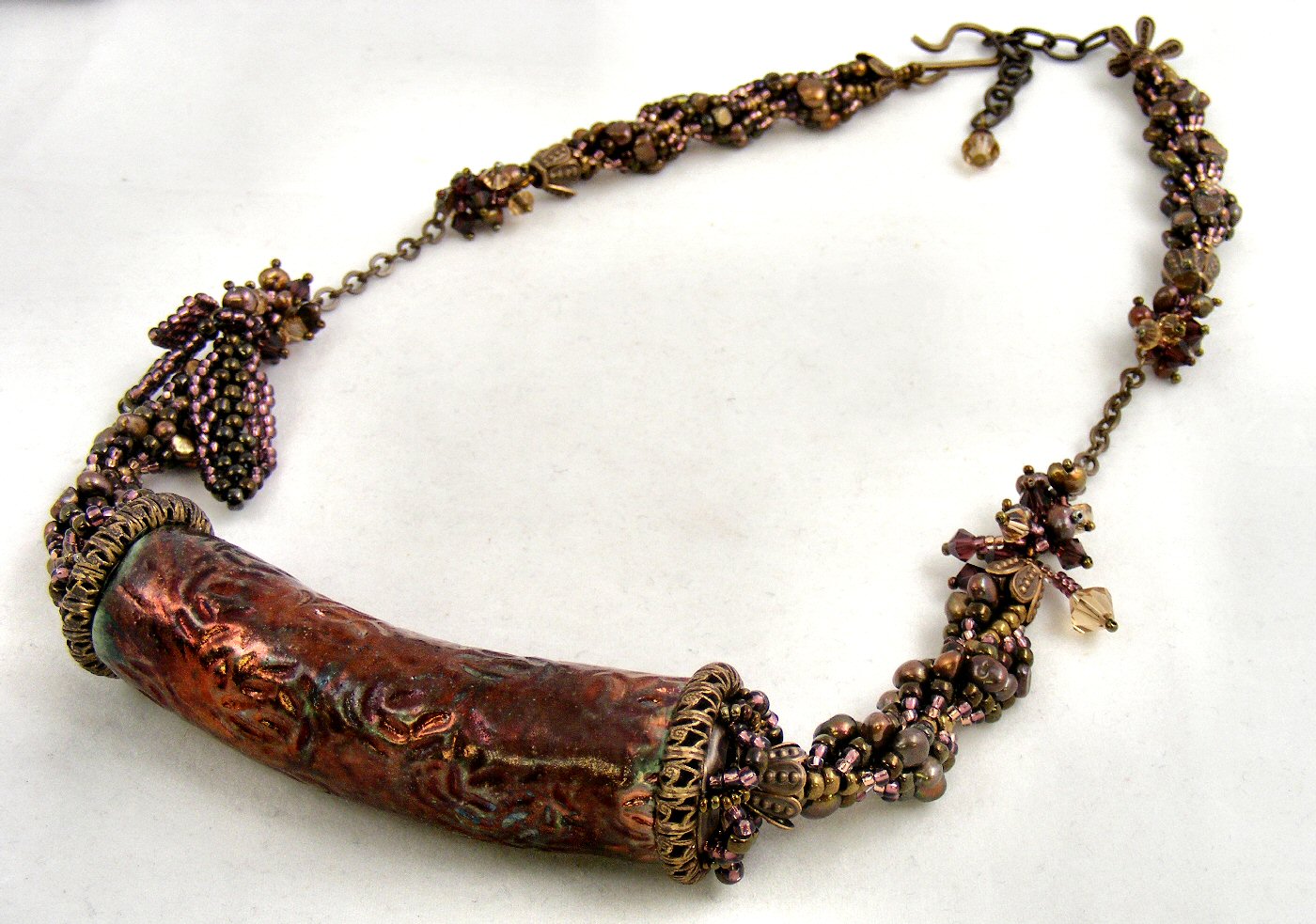
I had this gorgeous, large, burgundy Raku bead, and my original plan was to braid a simple beaded kumihimo rope to suspend it from.

But this design quickly became a study in problem solving, with problem #1 being that I didn't have any matching seed beads in a size that would work up into a beaded kumihimo rope.

So I decided I would fall back on one of my favorite beadweaving stitches, the spiral.

I had too many bead choices here, and had to play with them, and keep narrowing them down, so that I didn't end up with a overly busy or chunky spiral rope that would overwhelm the bead, despite the bead's size.

Because this raku cylinder bead was huge - almost 4 inches long, with a very large hole running through it.


This is the spiral I finally decided on: brown freshwater pearls, mauve seed beads, burgundy seed beads, olive green seed beads, and copper seed beads for the core. After stitching this 2 inch length, I came upon problem #2: how to cap the large raku bead?

I spent a couple of days working on this beadcap issue. I stitched a number of different attempts from seedbeads, in various sizes, and various patterns, but none of them worked; they needed to be relatively flat on the end, and then immediately flare out pretty widely, and then hug the bead.

And no ready-made beadcaps were anywhere near the size of this bead's end, so I kept stewing, and started looking around for anything I could use to cobble together a suitable beadcap.


I finally found a combination of Vintaj brass findings that I felt, theoretically anyway, could work.  I used metal punch pliers to punch 6 holes in a Vintaj brass ring, to correspond with the placement of the 6 petals on the Vintaj flower.


These are the 3 Vintaj components I finally settled on - the larger ring is a good size for the end of the Raku bead.


Here is how the 3 components stacked in my plan -  now I just had to get them to stay fastened together (and attach them to the bead!)

I made a number of attempts to wire-wrap the components together, but wasn't happy with any of the results.


So I decided to weave the components together with seed beads, and after several more tries, this is the (somewhat over-exposed, sorry) result. 

I then used 20g Vintaj brass wire to wire the caps to the bead, and then attached a length of spiral to each end.  The original plan, after settling on the spiral, was to have the whole necklace be a simple spiral, but by now I had so mych time and energy invested that I decided to glam it up, and added a short length of Vintage brass chain with fringe embeliishment comprised of Swarovski crystals and freshwater pearls to each side, before continuing on with the spiral rope.


Of course, I had to do some more embellishing, so I added fringe to one side, and some freeform peyote leaves to the other.


Then I finished with a Vintaj brass S-hook and extender chain, providing an adjustable finished length.


Tuesday, January 4, 2011

Very Sparkly Spiral Chainmaille Bracelet and Earrings

The spiral chainmaille rope is another of my favorite weaves. This set is woven with sterling silver half-round rings, so it is lighter in weight than you would expect, and the spiral weave allows the bracelet and earrings to catch the light with every movement. I just love this set!


The textured toggle reflects the spiral pattern in the bracelet, which is now available in my Etsy shop.

The matching earrings are also available in my shop!

And by the end of this week, I will have this bead embroidery cuff bracelet finished - or at least, that is the plan....lol.

Monday, December 27, 2010

Almost done with the Bead Embroidery Bracelet

This is one of those (hundreds of) projects that got started, and then put away and forgotten when other new projects presented themselves. I got about half of the stitching done last July, and, to be honest, burned myself out on it - the stitching goes on, and on, and on, and it feels like it is just never going to fill in.


But I picked it up on Saturday, and stitched all day long, and still felt like I was no closer to being finished, and at the end of the day I was tempted to just put all the beads away (it took almost 45 minutes to get the project set up!), but I knew that was part of the issue: when a project is such a pain to set up, it is much easier to avoid digging into it and trudging on. So I left it set up Saturday night, and there it was staring at me on Sunday, so I kept my promise to myself to work on nothing else until it was done.

I dragged my feet, though, and busied myself with other stuff (like snow! With the dogs!) and computer business, and finally started stitching around 1PM yesterday. And started to see the light at the end of the tunnel around 9PM, and actually stitched the last bead just a few minutes before midnight.

And packed up the whole thing to tote back to the shop, where I will hopefully be able to attach it to its frame and finish the edging this coming week.


This is my set-up as I started on Saturday morning - you can see the bracelet in the upper left, just as I pulled it out of the bag after putting it away back in July - less than half done, but enough of the pattern established that I had something to go on, but I also was somewhat limited by this, because, as beaders know, your stitching style and taste evolves and changes with time, so I had to go back and try hard to replicate what I had done back in July, because there was no way I was taking any stitches out!

I hope I have a finished picture of the bracelet to post before next July!